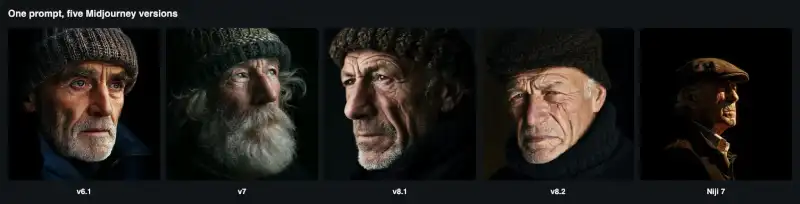
So we ran a benchmark. Over one weekday afternoon we sent 39 requests to the Midjourney API: the same three prompts on versions 6.1, 7, 8.1, 8.2 and Niji 7; repeated runs in relax, fast and turbo mode; a burst of five parallel requests; upscales; four deliberately broken requests; and four video clips at two resolutions. We timed every request from submission to the finished result, and we recorded the exact amount billed for each task. The whole benchmark cost $2.85.
These numbers are a snapshot from our account on one afternoon, not a service-level agreement, and they will change as capacity changes. But they are real measurements rather than marketing claims, and the method is simple enough for you to repeat on your own account.
The test harness
Midjourney's API is asynchronous. You submit a request and immediately receive a task ID. You then poll the task until its status is SUCCESS or FAILURE. An Imagine request produces a grid of four images. Follow-up actions, such as upscaling or animating, take a previous task ID or an image URL as input.
Our harness recorded three timestamps for every task: when we sent the request, when the submission returned, and when polling first saw a final status. We polled every three seconds, so each measured time includes up to three seconds of polling delay. We also recorded the server's own created and finished timestamps, which were consistently three to five seconds shorter than our wall-clock time. That difference is the polling interval plus network overhead.
import time, requests

BASE = "https://api.apimart.ai/v1"
H = {"Authorization": "Bearer YOUR_KEY"}

def timed(action, body):
    t0 = time.time()
    r = requests.post(f"{BASE}/midjourney/generations/{action}", headers=H, json=body)
    if r.status_code != 200:                      # validation errors arrive here
        return {"status": f"HTTP {r.status_code}", "error": r.json()["error"]["message"]}
    task_id = r.json()["data"][0]["task_id"]
    while True:
        t = requests.get(f"{BASE}/midjourney/{task_id}", headers=H).json()
        if t["status"] in ("SUCCESS", "FAILURE"):
            break
        time.sleep(3)
    billed = requests.get(f"{BASE}/tasks/{task_id}", headers=H).json()["data"]["cost"]
    return {"status": t["status"], "seconds": round(time.time() - t0, 1),
            "cost_usd": billed, "fail_reason": t.get("fail_reason")}
Two practical notes. First, submission is fast and predictable: across all 39 requests, the POST itself returned in 0.83 to 1.73 seconds, with a median of 0.9 seconds. Your user interface can show a "queued" state almost instantly. Second, the unified task endpoint, /v1/tasks/{id}, returns the actual billed cost of each task in dollars. That made it possible to report real costs in this article rather than estimates, and it is the easiest way to build per-user billing or budget alerts.
Test 1: how long does each version take?
We used three prompts that represent common use cases: a photorealistic object, a stylised illustration and a portrait.
A: a red vintage bicycle leaning against a sunlit brick wall, photorealistic
B: isometric illustration of a tiny floating island with a lighthouse, soft pastel colors
C: portrait of an elderly fisherman with a knitted wool cap, dramatic side light, 85mm lens
(size 1:1 · seed 777 · speed fast · versions 6.1, 7, 8.1, 8.2 and Niji 7, one at a time)
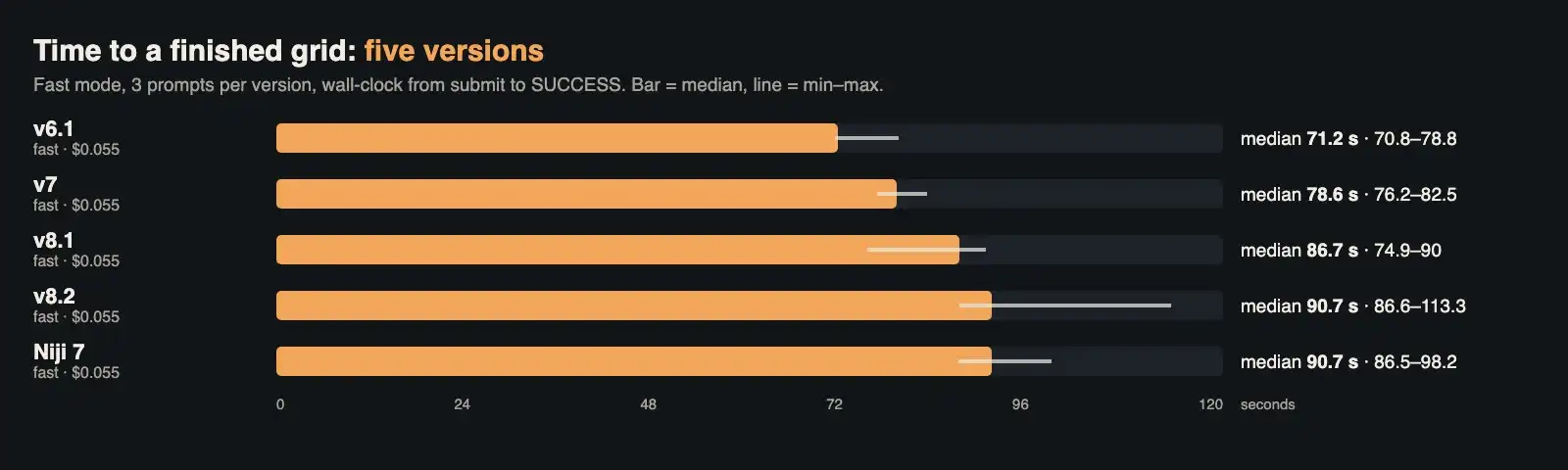
Median and range of submit-to-SUCCESS time for each version, fast mode.
There was a clear ordering. Version 6.1 was the quickest, with a median of 71 seconds and a very narrow range. Version 7 took a median of 79 seconds. Versions 8.1 and 8.2 and Niji 7 were slower, with medians between 87 and 91 seconds, and version 8.2 had the widest spread: one request took 113 seconds. Across all 15 requests the median was 86.5 seconds.
For product design, the key number is not the difference between versions but the overall scale. Only one of our 28 image generations, a turbo run, finished in under a minute. That is not a problem, but it does mean your interface needs a proper waiting experience: a progress state, a notification when the image is ready, or a background queue. A spinner that blocks the page for 90 seconds will feel broken.
Test 2: relax, fast or turbo?
Midjourney offers three speed modes with three prices. On our account, an Imagine request cost $0.045 in relax mode, $0.055 in fast mode and $0.10 in turbo mode, as confirmed by the billed cost of each task. We ran the bicycle prompt on version 8.1 three times in each mode.
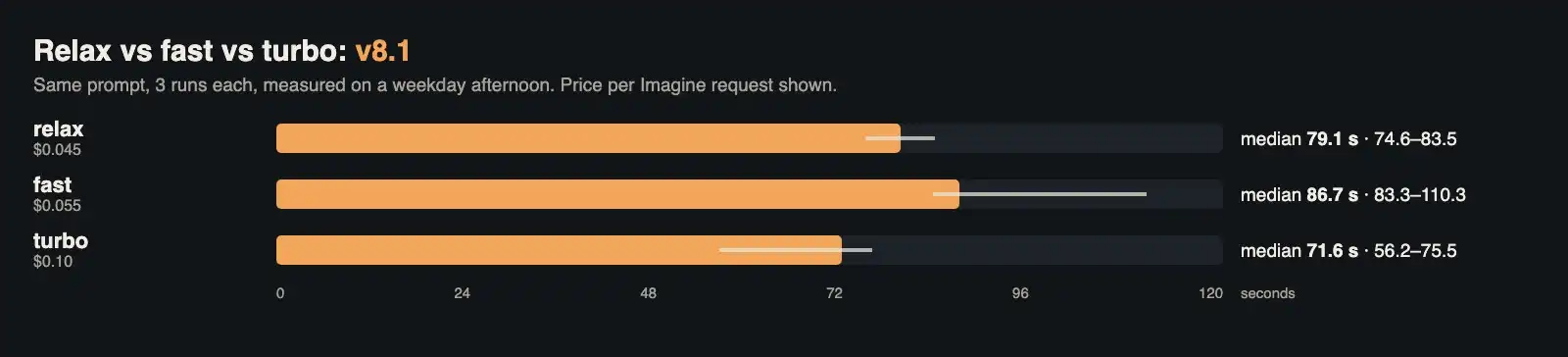
Speed modes on version 8.1, three runs each, with the price per request.
The results were not what the names suggest. Turbo was the fastest, with a median of 72 seconds and one run finishing in 56 seconds. But relax mode, the cheapest option, had a median of 79 seconds, which was actually quicker than fast mode's 87 seconds during our test. Fast mode also produced the slowest single run, at 110 seconds.
The likely explanation is load. Relax mode is a lower-priority queue, and when the queue is quiet, it runs as quickly as anything else. At busy times, relax requests can wait much longer, and that is exactly when fast mode earns its price. Our three-run samples are small, so do not read too much into the order of relax and fast. The practical lesson is stronger: speed mode is a priority setting, not a guaranteed speed. If latency matters, measure it at your own peak hours. If it does not, for example for overnight batch jobs, relax mode saves about 18 percent on every request. Turbo cost nearly twice as much as fast and saved about 15 seconds at the median, which is only worth it for interactive features where users are watching.
Test 3: five requests at once
Real products do not send one request at a time. We submitted five requests (the island prompt on version 8.1, fast mode, five different seeds) at the same moment and compared them with five sequential fast-mode runs on the same version.

Five parallel requests finished in roughly the same time as one.
All five parallel requests succeeded. They finished between 83 and 118 seconds after submission, with a median of 90 seconds, compared with a median of 87 seconds for the sequential runs. In other words, five parallel requests took about as long as one. There was no visible queue at this level of concurrency: the requests were processed side by side rather than one after another. We did not test higher concurrency, so if you expect dozens of simultaneous requests, run your own burst test and keep a client-side limit as a safety net.
Test 4: upscale latency
After a grid is generated, the next step is usually to pick one image. A standard upscale simply selects one of the four images already produced, so we expected it to be quick. It was: three upscales on different versions took 5.6 to 5.7 seconds each from submission to result, and all three were billed at $0.00. That makes it practical to upscale immediately when a user clicks a thumbnail, without any extra cost or a long wait.
Test 5: what you get for your money
Latency is only half of the picture. A cheaper or faster version is no bargain if more of its images are unusable. We looked at every image from the version test and counted those that followed the prompt's explicit requirements: photorealism for the bicycle, an isometric floating island for the illustration, and a knitted wool cap for the portrait. This is our judgement, but the criteria are deliberately strict and simple.
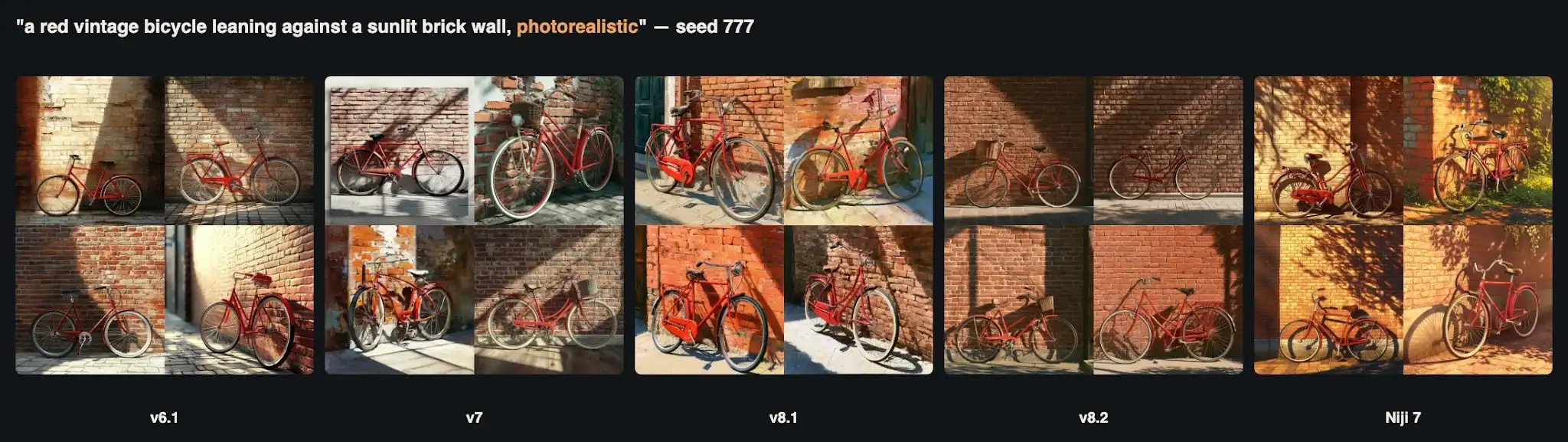
The "photorealistic" bicycle. Version 8.1 and Niji 7 returned painterly images instead.
The bicycle prompt held the biggest surprise. Versions 6.1 and 8.2 produced convincing photographs in all four images. Version 7 produced two photographs, one image that looked like a framed print and one that looked like a painting. Version 8.1 ignored the word "photorealistic" in all four images and returned rich, painterly renders, with visible brush texture. Niji 7, which is designed for illustration, did the same, as expected.
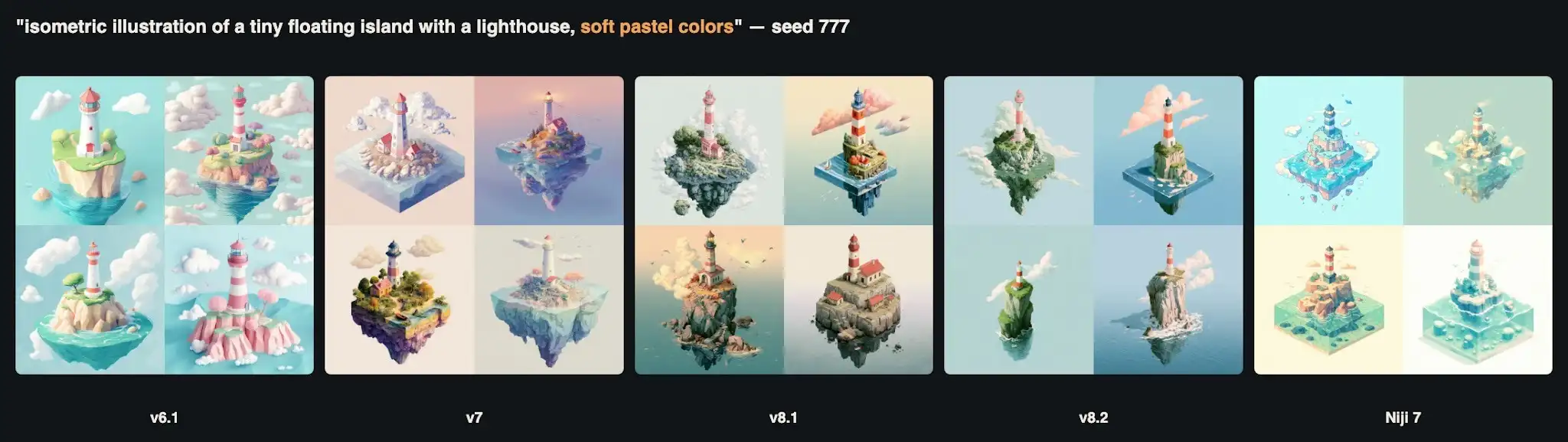
The isometric island. Every version produced attractive images, but version 8.2 drifted from the brief in two of them.
The illustration prompt was the easiest for every version. All twenty images were attractive. Version 8.2 was the only one to drift: two of its images showed a lighthouse on a sea stack rising from the water rather than an isometric floating island.
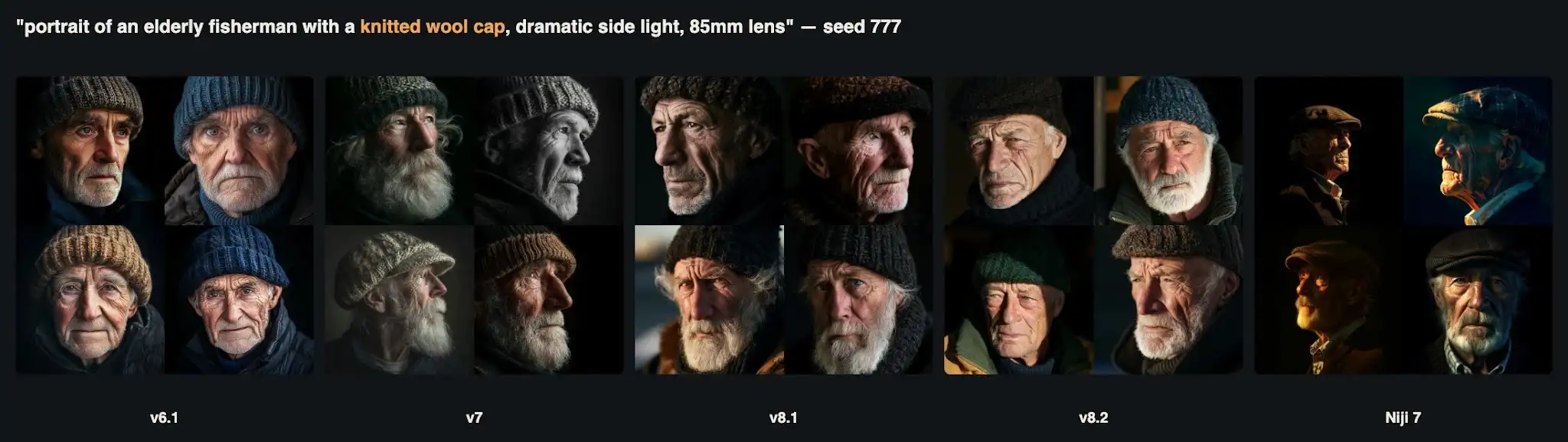
The portrait. Niji 7 replaced the knitted wool cap with a flat cap in all four images.
All four main versions produced strong, believable portraits with a knitted cap and dramatic side lighting. Niji 7 produced beautiful portraits too, but every one of its fishermen wore a tweed flat cap instead of a knitted one.
| Version | Median time | Usable images (of 12) | Cost per usable image |
|---|---|---|---|
| 6.1 | 71 s | 12 | $0.014 |
| 7 | 79 s | 10 | $0.017 |
| 8.1 | 87 s | 8 | $0.021 |
| 8.2 | 91 s | 10 | $0.017 |
| Niji 7 | 91 s | 4 | $0.041 |
The table shows why "newest" and "best" are different questions. For this particular set of prompts, the oldest version we tested, 6.1, was both the fastest and the most obedient. Version 8.1 has strengths that this benchmark does not measure, most notably accurate text rendering, but it was the most likely to apply its own style over an explicit instruction. Niji 7 is the right choice for anime and illustration, not for photographs or specific clothing details. The cost per usable image was between 1.4 and 4.1 cents in every case, so even the least efficient choice is cheap. The real cost is the human time spent reviewing images that miss the brief.
Test 6: how the API fails
A reliable integration depends on predictable errors. We sent four requests that we knew were invalid, and one more failure happened naturally during a separate test.
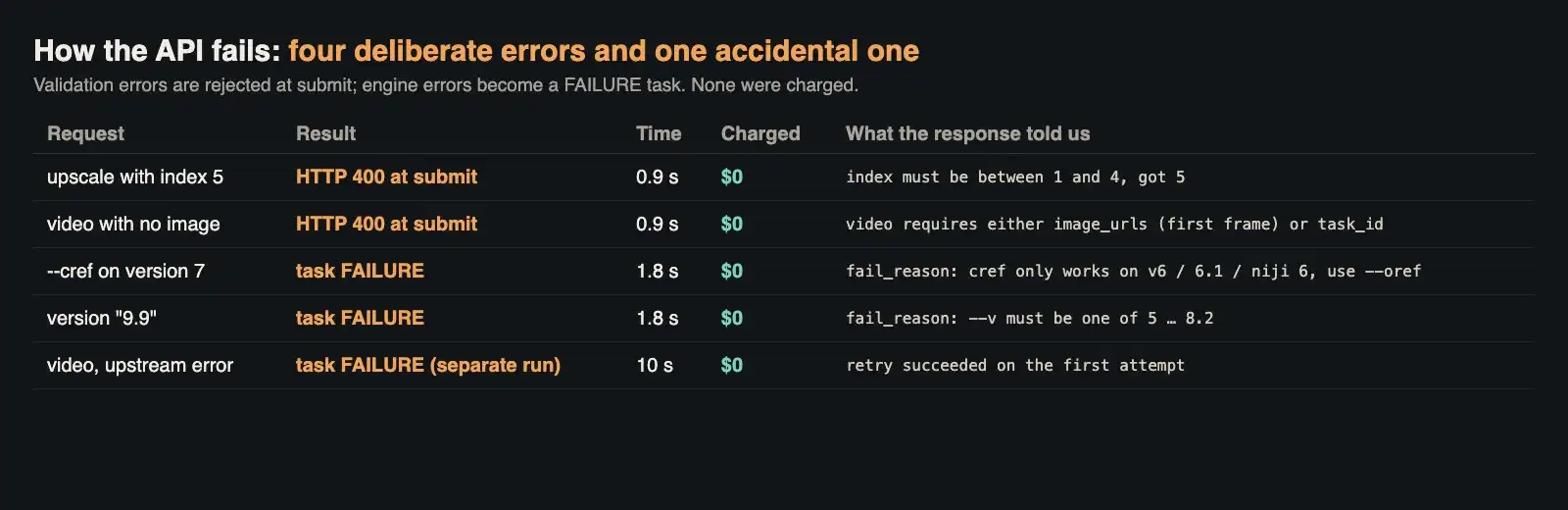
Error behaviour: validation errors at submission, engine errors as FAILURE tasks. None were charged.
The errors fell into two clean groups. Simple validation problems, such as an upscale index of 5 or a video request without an image, were rejected immediately with HTTP 400 and a clear message, for example "index must be between 1 and 4, got 5". No task was created. Problems that only the Midjourney engine can detect became tasks that ended in FAILURE within about two seconds. Sending --cref to version 7 failed with a reason explaining that character reference only works on versions 6, 6.1 and Niji 6 and that version 7 uses omni reference (--oref) instead. A version of "9.9" failed with the list of valid versions.
The fifth case was a video request in an earlier test that failed upstream after ten seconds with a generic execution error. We simply sent the identical request again and it succeeded. We checked the billed cost of all five failures: each one was $0.00. For your code, this means three rules: handle HTTP 400 at submission as a bug in your request, treat a FAILURE with a specific reason as a user-facing message, and retry a generic FAILURE once or twice before giving up.
Test 7: video latency and resolution
Midjourney's video model animates a still image into a five-second clip. It offers two resolution tiers. We animated two of our upscaled images, the version 8.1 and Niji 7 bicycles, in each tier, with low motion and the prompt "slow gentle camera push-in, subtle natural motion".
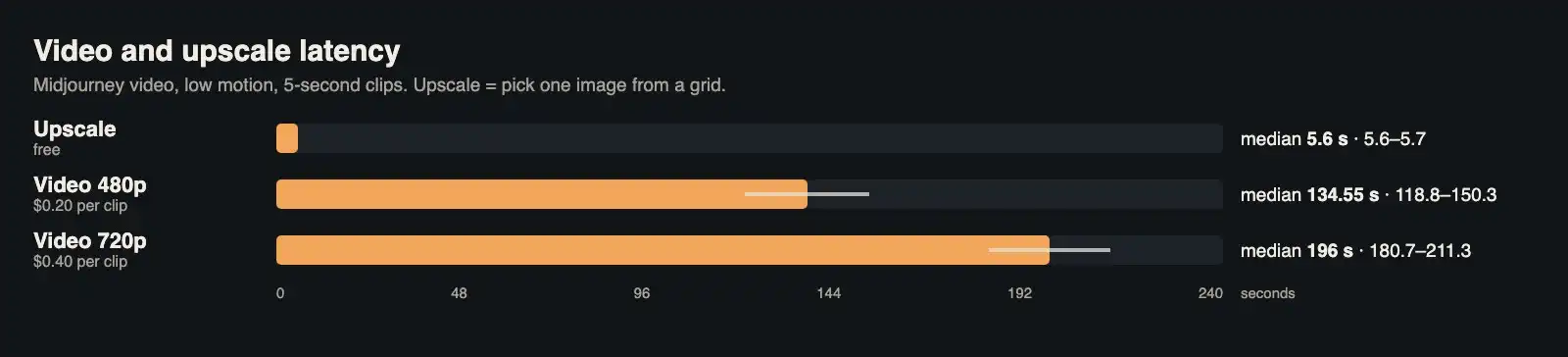
Upscales took about six seconds. Video took two to three and a half minutes.
The 480p clips took 119 and 150 seconds and cost $0.20 each. The 720p clips took 181 and 211 seconds and cost $0.40 each. Because our source images were square, the actual output sizes were 624 × 624 pixels for the 480p tier and 960 × 960 for the 720p tier, with the same five-second duration and 24 frames per second. The 720p files were also roughly twice as large: 11.4 and 15.4 MB, compared with 5.5 and 8.7 MB.
Low motion did not mean a static camera. The 480p clip of the 8.1 bicycle pushed in close to the handlebars, and the 720p Niji clip drifted downward until the bicycle slid partly out of frame; the other two stayed well framed. If framing matters, describe the camera move precisely or ask for a static camera. A sensible workflow is to preview motion at 480p, where both cost and waiting time are lower, and render the final version at 720p only after the motion has been approved. Video was by far the most expensive and slowest part of this benchmark: four clips cost $1.20, about 42 percent of the entire benchmark.
Test 8: putting the numbers into a product
To make the results concrete, here is how we would design a simple "generate a product image" feature from these measurements. Submit the request and show a queued state within one second. Expect a result after about 70 to 90 seconds and show progress, but allow up to two minutes before showing a "taking longer than usual" message, because our slowest image took 118 seconds. Let the user upscale instantly when the grid arrives, because it costs nothing and takes six seconds. Offer animation as a separate, clearly priced action, with a preview at 480p. Retry generic failures automatically once, and show specific failure reasons directly to the user.
For budgeting, the arithmetic is straightforward. In fast mode, 1,000 image generations cost $55 and produce 4,000 candidate images. If your users typically keep one image out of a grid, the effective price is 5.5 cents per finished image. If you can move non-urgent jobs to relax mode, the same volume costs $45. With these numbers in mind it is easy to access Midjourney via API in a cost-controlled way, and the per-task cost field means you can verify your spending against your own logs at any time.
What this benchmark does not tell you
Benchmarks are easy to over-read, so it is worth being explicit about the limits of ours. First, sample sizes are small. Three runs per speed mode and three prompts per version are enough to show orders of magnitude and obvious differences, such as the gap between a six-second upscale and a three-minute video, but not enough to rank modes that differ by a few seconds. If you need tight numbers, run each configuration twenty or thirty times and report percentiles rather than a median.
Second, everything was measured during one afternoon. Midjourney capacity changes with demand, and relax mode in particular is designed to slow down when the system is busy. Our finding that relax was not slower than fast is a statement about one quiet period, not a promise. Third, our concurrency test stopped at five parallel requests. That is realistic for a small product, but a popular feature can easily produce fifty simultaneous requests, and queueing behaviour at that scale may look very different.
Fourth, the "usable image" score is a judgement against three explicit requirements, not a measure of beauty. Version 8.1's painterly bicycles are lovely images; they simply did not follow the word "photorealistic". A different prompt set, for example one heavy on typography, would favour version 8.1 strongly. The right way to use this table is to build your own small prompt set from your real use case and repeat the test. The harness above is about twenty lines of code, and with the billed-cost field the whole exercise costs a few dollars.
The full results
| Test | Requests | Median time | Billed |
|---|---|---|---|
| Version comparison, fast | 15 | 86.5 s | $0.83 |
| Relax mode | 3 | 79.1 s | $0.14 |
| Extra fast runs | 2 | 96.8 s | $0.11 |
| Turbo mode | 3 | 71.6 s | $0.30 |
| Five parallel requests | 5 | 90.2 s | $0.28 |
| Upscales | 3 | 5.6 s | $0.00 |
| Deliberate errors | 4 | 0.9–1.8 s | $0.00 |
| Video, 480p | 2 | 134.6 s | $0.40 |
| Video, 720p | 2 | 196.0 s | $0.80 |
| Total (exact billed amount; rows are rounded) | 39 | — | $2.85 |
A checklist for integrating Midjourney
- Design for a 60 to 120 second wait. 27 of our 28 image generations took more than a minute.
- Treat speed modes as priorities, not guarantees. Relax was not slower than fast in our quiet-period test, but that will change under load.
- Use relax mode for batch work. It saves about 18 percent per request compared with fast mode.
- Do not assume the newest version is best for every prompt. Version 6.1 was the fastest and most obedient on our prompt set; 8.1 ignored "photorealistic".
- Parallel requests are fine at small scale. Five at once took about as long as one.
- Upscale freely. It is free and takes about six seconds.
- Handle errors by type. HTTP 400 is your bug; FAILURE with a reason is a user message; a generic FAILURE deserves a retry. Failures were not charged.
- Preview video at 480p. It costs half as much and returns about a minute sooner.
- Log the billed cost of every task. The unified task endpoint returns it, which makes budgets and per-user billing simple.
The bottom line
As an API, Midjourney behaves predictably. Submissions return in under a second, images arrive in 70 to 90 seconds, upscales take six seconds, five parallel requests are handled side by side, errors are clear and free, and every task reports what it cost. The two surprises in our data are worth remembering: speed modes are about priority rather than raw speed, and the newest version is not automatically the most obedient. If you want to run this benchmark on your own workload, or compare Midjourney's numbers with other image and video models through a single key, everything we used is available on apimart.ai.
As an API, Midjourney behaves predictably. Speed modes are about priority rather than raw speed, and the newest version is not automatically the most obedient.