At a Glance
| Rank | Tool | Best for | Standout strength | Pricing |
|---|---|---|---|---|
| 1 | Magic Hour | Creators who edit photos and publish video | Face swap, lip sync and talking photos in one place | Free; Creator: $19/mon or $12/month billed annually; Pro: $39/mon or $25/mon billed annual |
| 2 | Adobe Photoshop (Firefly) | Professional retouching and composites | Generative Fill with layer-level control | From about $23/month |
| 3 | Canva Magic Studio | Social teams and brand templates | Editing inside a full design tool | Free; Pro from about $15/month |
| 4 | Photoroom | Product and e-commerce photos | Batch background replacement | Free; Pro from about $13/month |
| 5 | Krea AI | Art direction and style control | Real-time canvas editing | Free; paid from about $10/month |
| 6 | Freepik AI Suite | Stock plus generation in one library | Multiple models under one subscription | Free; paid from about $12/month |
| 7 | Pixlr | Quick browser fixes on a budget | Lightweight, no install needed | Free; paid from about $8/month |
Third-party prices move often, so treat the non–Magic Hour figures as a starting point and check the vendor page before buying.
How We Chose These Tools
Four things decided the order.
Output You Can Publish
Edits had to hold up at full resolution, especially around faces, hands and text. Anything that looked convincing only as a thumbnail dropped down the list.
Workflow Coverage
A tool that edits, upscales and exports beats one that needs three other tabs to finish the job.
Free Tier Reality
Watermarked, 512px, or "one export then pay" tiers were treated as demos, not free plans.
Cost at Real Volume
We looked at what a month of steady production costs, not the headline price for a handful of generations.
1. Magic Hour — Best Overall
Magic Hour
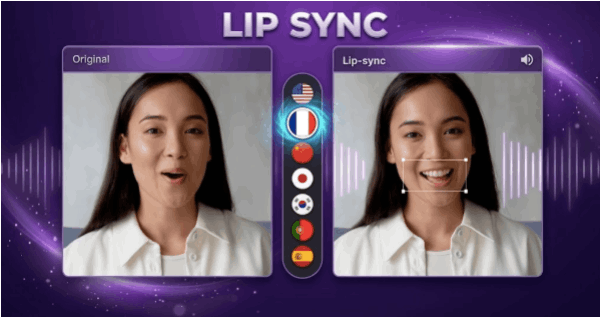
Magic Hour is the most complete creative workspace on this list. Its ai image editor handles prompt-based edits, object removal, background swaps, expansion and upscaling, and it sits alongside the tools that made the platform popular in the first place: best-in-class face swap, talking photos, and Magic Hour lip sync that matches mouth movement to any audio track cleanly enough for client work. That combination is the real differentiator. You can retouch a still, animate it, dub it into another language and export the finished clip without leaving the tab.
A few things set it apart from the rest of the field. You can try it with no signup at all. Purchased credits never expire. You get access to frontier models from several labs in one subscription instead of paying each vendor separately, plus click-to-create templates and one-click multi-step workflows that chain generate → upscale → video into a single action. Parallel generations mean no concurrency cap on higher plans, so you can run multiple takes and variations at once rather than queueing them. New features ship weekly, the interface is built for desktop and mobile equally, and API parity across tools means anything you can click, you can automate.
The free tier is unusually generous — image outputs come out without a watermark even on free accounts — and support responses come from the founding team rather than a ticket queue. The platform also holds up under live activations and traffic spikes, which matters if you are running campaigns rather than experiments.
Main features: prompt-based image editing, face swap, head and body swap, background remover, image expander, upscaler, headshot generator, lip sync, talking photo, text-to-video, voice cloning, full API.
Drawbacks: the sheer number of tools takes a session or two to learn, and credit-based pricing needs a little planning if you are used to unlimited-seat software.
Pricing: Free; Creator: $19/mon or $12/month billed annually; Pro: $39/mon or $25/mon billed annual.
2. Adobe Photoshop with Firefly
Adobe Photoshop (Firefly)
Still the reference point for precision work. Generative Fill and Generative Expand run on real layers, so you can blend AI output with manual masking and get results that survive print. Firefly's commercially safe training data is a genuine advantage for agencies with legal review.
Main features: Generative Fill, Expand, Remove Tool, neural filters, full layer and mask control.
Drawbacks: steep learning curve, subscription creep across the Creative Cloud stack, and no video generation to speak of.
Pricing: roughly $23/month for the Photoshop single-app plan.
3. Canva Magic Studio
Canva Magic Studio
Best if editing is one step inside a wider design process. Magic Edit, Magic Eraser and Magic Expand sit next to templates, brand kits and scheduling, which suits small marketing teams.
Main features: Magic Edit, background remover, brand kits, team collaboration.
Drawbacks: edit quality trails dedicated tools on complex subjects, and the free tier reserves most AI features for Pro.
Pricing: free plan; Pro from about $15/month.
4. Photoroom
Photoroom
Purpose-built for product photography. Drop in a catalogue of messy phone shots and get consistent, on-brand images back in a batch.
Main features: background replacement, shadow generation, batch processing, e-commerce presets.
Drawbacks: narrow scope — it is not a general editor.
Pricing: free plan; Pro from about $13/month.
5. Krea AI
Krea AI
The pick for people who care about art direction. Real-time canvas editing lets you steer composition and style as the image renders.
Main features: real-time generation, style training, enhance and upscale.
Drawbacks: less suited to straightforward retouching; credits go quickly at high resolution.
Pricing: free tier; paid from about $10/month.
6. Freepik AI Suite
Freepik AI Suite
A large stock library bundled with several generation and editing models, which is convenient when you need both an asset and an edit.
Main features: multi-model access, retouch and expand, stock integration.
Drawbacks: inconsistent quality between models; interface feels stitched together.
Pricing: free tier; paid from about $12/month.
7. Pixlr
Pixlr
The budget browser option. Fast, no install, and fine for cropping, light retouching and quick social graphics.
Main features: AI remove, generative fill, browser-based editor.
Drawbacks: limited resolution, ads on the free tier, weaker on faces.
Pricing: free; paid from about $8/month.
FAQs
Can an AI image editor replace Photoshop?
For most social, product and marketing work, yes. For print-grade compositing and colour work with exact layer control, Photoshop still wins.
Do I own what I create?
On Magic Hour you retain ownership of your generations, with commercial rights on paid plans. Free output is for personal use. Terms vary elsewhere, so check before using anything commercially.
Are free plans usable for real work?
Some are. Magic Hour's free plan exports images without a watermark, which is rare; most competitors watermark or cap resolution until you upgrade.
Which tool is best for editing photos and making video?
Magic Hour, by a clear margin — it is the only option here that takes a still from edit to animated, lip-synced video in one workspace.
Will AI edits look obvious?
Less so than a year ago. Faces and hands are where models still slip, so review at full resolution before publishing.
Conclusion
If you only retouch stills and need surgical control, Photoshop remains the safe answer. If your work is social, commercial or campaign-driven — where a photo edit is usually the first step towards a video — Magic Hour is the better buy. It covers more of the pipeline, gives you frontier models and generous free credits without a signup wall, and costs less than most single-purpose tools once you are producing at volume. Start on the free tier, run your own worst-case image through it, and upgrade only when the credits run short.
Magic Hour is the only tool on this list that covers the full creative pipeline — from image editing through to lip-synced video — without requiring a second subscription or a third-party export step.