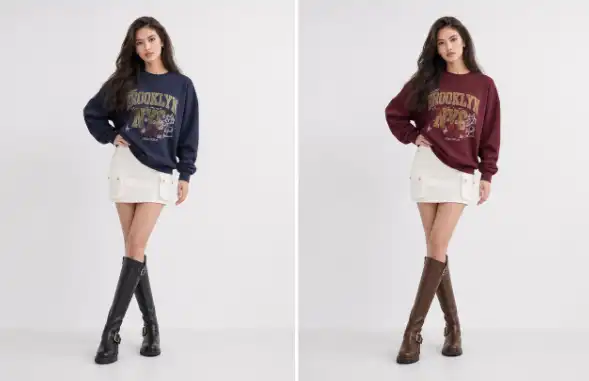
Scenario One: Showing More Colors and Styles
Many clothing stores sell the same shirt, dress, jacket, or pair of trousers in several colors. Photographing every option on a model can double or triple the production budget, even though the pose, background, and styling may stay nearly identical.
AI clothing replacement can create additional color or style variations from one approved model photo. A store might photograph a black blouse in a studio, then create previews for navy, cream, green, and burgundy versions. These images can support product listings, email campaigns, and internal planning before the business decides which colors deserve a full shoot.
The main benefit is lower cost per variant. The retailer still needs accurate reference images and careful review, but it may avoid booking a model and photographer for every color. This works especially well for basic garments with a clear shape and minimal detail, such as T shirts, sweaters, casual dresses, and simple outerwear.
Accuracy matters here. If the generated color looks too bright, changes the fabric texture, or loses buttons and seams, customers may receive a misleading impression. Teams should compare the result with the real garment and label images internally as generated previews until someone has checked them.
Scenario Two: Testing New Products Before a Full Shoot
Fashion businesses often need to make decisions before every product is ready for polished photography. A designer may have a new pattern, a supplier may send a sample late, or a marketing team may want to test several looks before committing to a campaign.
An AI clothes changer gives teams a faster way to create early visual concepts. With an AI Clothes Changer, a retailer can explore how a garment might look on different models, in different poses, or within a consistent visual style. These images can help with buying decisions, ad testing, mood boards, and conversations between design and marketing teams.
The financial benefit comes from reducing risk rather than simply lowering the cost of one image. A store can test which silhouette or color attracts attention before paying for a larger shoot. If one concept clearly performs better, the business can direct its photography budget toward that option instead of producing polished images for products that may not sell.
This method also helps when stock is limited. A store may have only one sample garment, making it difficult to prepare several creative concepts at once. Generated images can support planning while the physical sample remains available for quality checks and final photography.
Scenario Three: Expanding Model and Outfit Combinations
A clothing store may want to show its products on several body types, ages, or personal styles. Traditional production can make that goal expensive because each model adds time for casting, fitting, hair and makeup, lighting, and post production.
AI can help a team create additional outfit concepts from a smaller set of source images. For example, one retailer might use a consistent studio setup for its core catalog, then create alternate visuals for social media or style guides. The store can show how the same jacket works in a casual outfit, an office look, or a layered winter combination.
The benefit is greater creative range without repeating the full production process. This can make content planning easier for stores that need frequent social posts but do not have the budget for weekly shoots. It also gives merchandising teams a way to show related products together before every item has been photographed in the same session.
There are limits. Clothing fit is not purely visual, and an AI generated image may not prove how a garment hangs, stretches, or feels on a real person. Stores should avoid presenting generated model images as a guarantee of fit. Product measurements, fabric details, and honest sizing information still do more for customer confidence than a larger number of polished images.
| Use case | Cost saving opportunity | Human review needed |
|---|---|---|
| More color options | Fewer separate model shots | Check color and fabric accuracy |
| Early product testing | Avoid full shoots for weak concepts | Compare with the physical sample |
| More model and outfit combinations | Reduce repeated styling and casting | Check body shape, fit, and realism |
A Practical Workflow for Lower Photo Costs
The most reliable process starts with a strong source image. Use a clear photo with even lighting, a simple background, and a model pose that shows the garment without hands or hair covering important areas. Front facing or three quarter poses are often easier to edit than extreme movement shots.
Next, prepare accurate clothing references. A flat lay, product photo, or clean image of the garment can give the tool useful information about color, shape, and design details. Remove clutter from the reference where possible, and use images that show the sleeves, neckline, fasteners, and main pattern clearly.
Create a small batch of variations instead of generating dozens at once. Start with two or three options that answer a real business question, such as which color belongs in an advertisement or which outfit works best for a collection page. This keeps review time under control and prevents the team from filling its content library with images that have no clear purpose.
Review each image against the real item. Look closely at logos, stripes, pockets, collars, buttons, hems, and areas where the garment overlaps the body. Hair, fingers, jewelry, and shadows can also create errors around the clothing. A quick visual check is not enough for important product pages, so someone familiar with the garment should approve the final image.
The final stage is to use the images in the right place. Generated visuals can work well for concept boards, social content, collection previews, email tests, and selected catalog images. For premium products, technical garments, or items where fit is the main selling point, combine them with real photos rather than relying on generated images alone.
What Stores Should Watch For
The biggest mistake is treating AI output as finished photography without review. A convincing image can still show the wrong sleeve length, an altered print, or a shape that the real garment cannot produce. If customers receive something different from what the image suggests, the short term saving may lead to returns, complaints, and lost trust.
Another problem is inconsistency. If every image uses a different lighting style, body shape, background, or editing level, a store can end up with a catalog that feels disorganized. Create a simple visual standard before producing variations. Keep the same background, crop, image size, and general pose style when the images will appear together.
Stores should also protect customer expectations. If a generated image shows a garment on a model, the listing should still include real measurements, material information, care instructions, and clear details about what is included. Generated images are strongest when they improve understanding, not when they hide missing product information.
Privacy and permissions deserve attention as well. Use model images that the business owns or has permission to edit, and keep source files in a controlled location. Teams should also decide who can approve generated images and where those images may be used, especially in paid advertising or marketplaces with strict content rules.
Building a Sensible Cost Saving Plan
A good starting point is to compare the cost of one traditional image set with the cost of creating and reviewing several AI variations. Include staff time, subscriptions, retouching, approvals, and the cost of correcting inaccurate images. The result may not show savings on every garment, but it can reveal where the process has the most value.
Basic products with repeated shapes usually offer the clearest opportunity. Seasonal colors, simple knitwear, everyday tops, and early design concepts can often be handled more efficiently than highly detailed formalwear or technical clothing. The more a product depends on exact construction and fit, the more important real photography becomes.
The strongest workflow combines both methods. Use AI to explore options, fill content gaps, and reduce unnecessary reshoots, then use professional photography for hero images and products that need close inspection. This approach cuts waste without asking customers to rely on images that may not reflect the garment accurately.
Online clothing stores do not need to choose between traditional photography and AI. Used carefully, an AI clothes changer can reduce the number of samples, model sessions, and repeated setups required for everyday content. The savings come from faster testing and fewer unnecessary shoots, while human review protects the quality and trust that product photography is meant to create.
- AI clothing tools help retailers create color and style variations from one approved model photo
- Early product testing with AI reduces risk before committing to a full photoshoot
- Expanding model and outfit combinations becomes more affordable with AI-assisted visuals
- A strong source image and accurate clothing references produce the most reliable results
- Every generated image should be reviewed against the real garment before use
- Consistency in lighting, background, and crop keeps the catalog looking organized
- Generated images work best alongside real photography, not as a full replacement
- Use model images the business owns or has permission to edit